
10 Best Webinar and Event Marketing Platforms


The best webinar and event marketing platforms serve different kinds of events. A monthly product demo needs reliable registration, live video, and lead follow-up. A hybrid conference may also need parallel sessions, networking, sponsors, ticketing, and onsite check-in. When I compare these tools, I start with the event a team actually plans to run, not the longest feature list.
This guide covers 10 platforms with distinct strengths. I checked their published features, pricing pages, and help documentation on October 8, 2026. Prices and plan details can change. I looked beyond the live broadcast. Registration, promotion, audience participation, follow-up content, reporting, and integration with marketing tools all affect whether an event meets its goal. I also checked what each vendor makes clear about pricing and plan limits.
This is a shortlist by use case, not a claim that one tool will be best for every organization. Eventbrite, for example, earns its place through ticketing and public event discovery. Teams still need to choose an appropriate video platform for the webinar itself.
The best webinar and event marketing platforms at a glance
| Platform | Best for | Main formats | Pricing approach |
| Demio | Recurring marketing webinars | Live, series, automated, on-demand | From $45/month with annual billing |
| Livestorm | Browser-based webinars | Live, replay, on-demand | Annual attendee credits |
| Zoom Webinars | Teams already using Zoom | Webinars; broader events on higher products | License and audience capacity |
| BigMarker | Configurable event programs | Webinars, virtual, hybrid | Custom quotes; some per-event licenses |
| ON24 | Enterprise engagement insights | Webinars, content hubs, virtual events | Custom quote |
| Goldcast | B2B events and content repurposing | Webinars and digital events | Custom quote for event hosting |
| Airmeet | Interactive and networking-led events | Webinars, virtual, hybrid | Webinar starting price; event quote |
| Cvent | Large portfolios of different events | Online, hybrid, in-person | Modular custom quote |
| Bizzabo | Conferences and onsite experiences | In-person, virtual, hybrid | Annual subscription from $17,999 |
| Eventbrite | Public registration and ticket sales | In-person and online registration | Fees on paid tickets |
Starting prices are in US dollars where shown. They may not include the capacity, integrations, or services your event needs.
1. Demio: Best for recurring marketing webinars
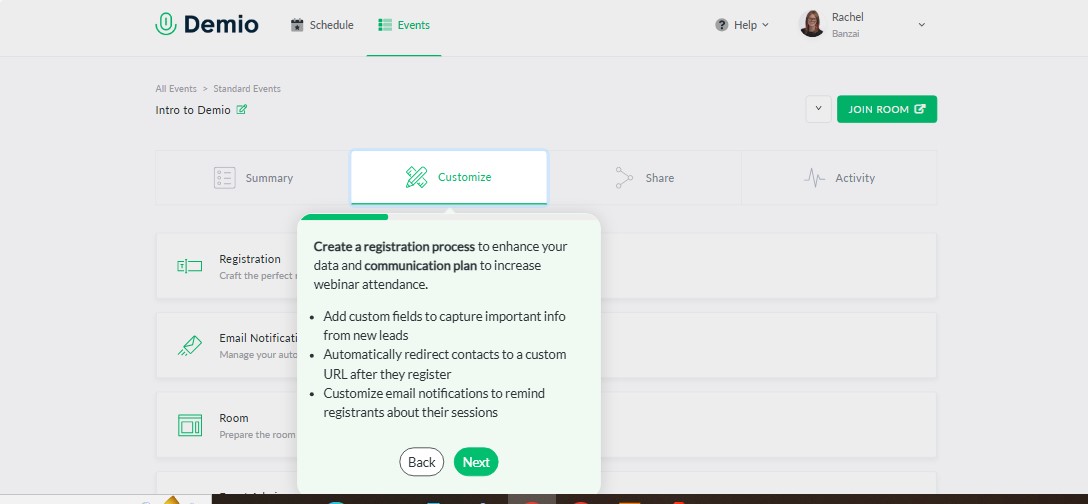
Demio suits a small marketing team running regular demos, educational sessions, or lead generation webinars. It combines registration pages, reminders, live engagement, recordings, and reporting in a focused webinar workflow. Event series make it useful when the same program runs week after week.
Starter costs $45 per month with annual billing, or $63 with monthly billing. That entry plan provides one host and a 50-attendee room. Automated and on-demand webinar formats require Growth or higher.
I would put Demio near the top of a shortlist for repeatable webinars, especially when the team wants a clear route from registration to follow-up. Before buying, check the room size, number of hosts, and availability of your required CRM integration on the quoted plan.
2. Livestorm: Best for browser-based webinars
Livestorm handles registration, event emails, live interaction, and replay access within a browser-based experience. What stands out to me is its billing model: paid plans use annual attendee credits tied to actual attendance, rather than simply counting registrations.
One credit is used when an external attendee joins a session live or watches its replay or on-demand version. Someone who attends live and later watches the replay of the same session counts once. If that person attends a different session, another credit is used. Internal team members do not consume attendee credits.
The free plan is intended for evaluation, with 30 attendee credits per year and a 30-minute event limit. Livestorm’s published Pro pricing lists 400 annual credits for $1,200 in US dollars. I would estimate a full year of live attendance and replay viewing before deciding whether that model suits the budget.
3. Zoom Webinars: Best for teams already using Zoom
Zoom Webinars is a natural option for organizations whose speakers already know Zoom. Standard webinar features include registration, controlled audience participation, polls, Q&A, recordings, and reports. That familiar setup can be valuable for straightforward presentations.
The product tiers matter. Webinars Plus adds production features such as a private backstage area and simulive presentations. Zoom Events adds capabilities for multi-session events, ticket types, networking, and hybrid experiences.
Zoom advertises webinar plans starting at $79 per month. I would treat that as a starting point for a specific webinar configuration, not the final price for an entire event program. Confirm the necessary account license, attendee capacity, and product tier before comparing its quote with another platform.
4. BigMarker: Best for configurable event programs
BigMarker is worth examining when an event program needs more than a standard webinar room. Its offering spans webcasts, registration flows, virtual venues, networking, engagement features, and onsite tools. That range gives organizers room to shape different event experiences.
It also means the quote needs close attention. BigMarker asks buyers to request pricing for webcast plans. Its virtual and hybrid event license is priced per event, with volume pricing available. Other components can have separate licensing arrangements.
I would send BigMarker a precise event brief before requesting a proposal: expected attendance, number of sessions, registration flow, CRM requirements, networking, replay access, and onsite needs. A detailed brief makes it easier to see what the quoted package actually covers.
5. ON24: Best for enterprise webinar engagement insights
ON24 focuses on webinars as part of a wider marketing program. It supports interactive sessions, calls to action, follow-up content, and reporting on audience behavior, including responses to polls, questions, and resource engagement.
That depth is useful when a team wants to understand what attendees did, then use those signals in sales or marketing follow-up. ON24’s pricing page lists virtual events as an add-on, so buyers planning conferences should confirm that capability separately.
ON24 directs buyers to request pricing. If I were evaluating it for a marketing team, I would ask for a demonstration that follows one registrant from signup through the webinar and into the CRM. That reveals more than a feature checklist about the data the team can actually use.
6. Goldcast: Best for turning B2B events into more content
Goldcast is a strong candidate when the work continues after the live event. Its event platform includes registration, engagement, on-demand access, and reporting. Its Content Lab helps teams repurpose recordings into clips and written assets for later campaigns.
There is an important distinction in its pricing. Goldcast has a free standalone Content Lab plan, but that is not a free event-hosting plan. Event-hosting prices require a sales conversation. Its published Starter documentation lists 12 included events and a 90-minute maximum event length; additional events can be purchased.
I would shortlist Goldcast for a B2B team that plans to distribute event content for weeks or months. In the demo, I would ask to see the complete workflow from live session to finished clips, on-demand page, and lead record. Event allowances and content processing limits also deserve a line in the quote.
7. Airmeet: Best for interactive and networking-led events
Airmeet is suited to teams that want attendees to do more than watch a presentation. Its Premium Webinars offering includes live, simulive, and on-demand formats, along with engagement tools, analytics, registration, and integrations. Its Events offering expands into parallel tracks and in-person, virtual, and hybrid formats.
Premium Webinars start at $167 per month with annual billing, or $199 with monthly billing. The published entry configuration includes two team members and starts at 100 attendees per webinar. Full Events pricing is customized.
I would evaluate Airmeet against the attendee experience: how easily people join, move between sessions, participate, and connect with others. The published webinar starting price should not be used as an estimate for a multi-track or hybrid conference.
8. Cvent: Best for a broad event portfolio
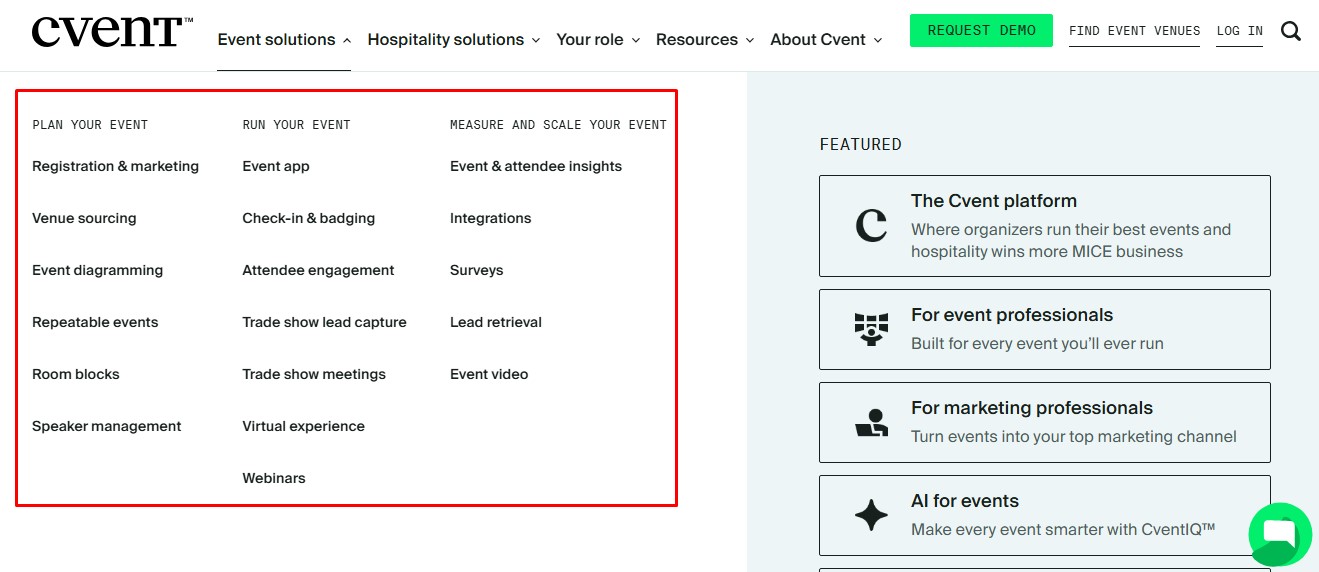
Cvent serves organizations managing many events across teams, formats, or regions. Its products cover registration, attendee experiences, webinars, onsite check-in, and related event operations. Bringing those workflows together may help a company manage consistent processes and data.
The scope makes it important to define the purchase carefully. Cvent lists distinct products and services, including Attendee Hub, OnArrival, and Webinar options, and provides pricing through a quote.
I would begin a Cvent evaluation with the next year’s actual event calendar. Which events are online? Which require check-in or an event app? What information must reach the marketing system? Then I would ask Cvent to map each requirement to a quoted product, service, or add-on.
9. Bizzabo: Best for conferences and onsite programs
Bizzabo is built for an ongoing event program, particularly when conference registration, communications, mobile access, and onsite operations need to work together. Its core Event Experience OS lists event websites, email campaigns, ticketing, registration, a mobile app, and reporting.
The published starting price is $17,999 per year, billed annually, with a three-user minimum. Bizzabo requires an annual subscription for the core platform. Its enhanced Virtual Event Experience is listed as a premium add-on.
For a team running several substantial events, I would compare the annual program cost, not just the base subscription. Include any virtual production, onsite equipment, integrations, and services the team expects to need.
10. Eventbrite: Best for public discovery and ticket sales
Eventbrite makes sense when the immediate job is publishing an event, collecting registrations, and selling tickets. It can suit paid workshops, community events, and webinars that rely on public promotion.
Publishing a free event has no ticketing fee. Paid-ticket fees vary by country, currency, and setup. For an online presentation, organizers can connect a Zoom meeting or webinar or link to another video provider.
I would choose Eventbrite for the registration and ticketing side, then assess the video experience separately. If you plan a recurring webinar series, test the setup first: Eventbrite’s direct Zoom integration does not support its recurring-event feature.
How to choose the right platform
If I were buying for an event team, I would begin with the attendee journey rather than a vendor demo. Write down what a person must do before, during, and after the event. Then ask each shortlisted vendor to show that exact journey.
Four questions usually expose the differences:
- What will attendees experience? Check sign-up, joining, mobile access, interaction, replay, networking, and any on-site check-in.
- What information will your team receive? Request sample CRM records for a registrant, a no-show, a live attendee, and a replay viewer.
- What determines the total price? Account for hosts, capacity, attendee credits, ticket fees, event allowances, annual commitments, and add-ons.
- What happens after the event? Confirm recording access, content reuse, follow-up emails, reporting, and asset retention.
For a recurring webinar program, I would start with Demio, Livestorm, and Zoom Webinars. For deeper B2B engagement and content campaigns, I would compare ON24 and Goldcast. Airmeet and BigMarker deserve attention when interaction or event customization matters. For a broad conference program, I would request scoped proposals from Cvent and Bizzabo. Eventbrite is the clear shortlist candidate when public registration and ticket sales are the priority.
Frequently asked questions on the Best Webinar and Event Marketing Platforms
1. What is the difference between webinar software and an event marketing platform?
Webinar software centers on a structured online presentation, including registration, hosting, audience interaction, and recordings. An event marketing platform may also manage promotion, ticketing, multiple sessions, sponsors, networking, on-site operations, and data across events. Check the specific plan, because these capabilities are not always included together.
2. Can Eventbrite host the webinar video itself?
Eventbrite provides the online event page and can connect attendees to Zoom or another video provider. Assess the video platform separately for audience capacity, production features, interaction, and recordings.
3. Are there free options for marketing webinars?
Livestorm has a free evaluation plan with limited annual attendee credits and event duration. Eventbrite does not charge a ticketing fee for free events, though an online session still needs a video provider. Goldcast’s free Content Lab plan is for repurposing video, not hosting events.
4. Which platform is best for B2B lead generation?
The best fit depends on the follow-up workflow. Demio supports repeatable marketing webinars. Livestorm combines webinar registration and attendance tracking. ON24 emphasizes engagement insights, while Goldcast helps extend the value of event content. I would ask each vendor to demonstrate the lead record a sales team receives after a session.
5. Do hybrid events require a dedicated platform?
A small hybrid event may be manageable with separate registration, streaming, and onsite tools. As parallel sessions, ticket types, networking, and check-in grow more complex, a platform built for those workflows becomes more useful. Compare the relevant packages from Airmeet, BigMarker, Cvent, and Bizzabo against the event you intend to run.


