

Short answer: A WordPress author page should identify one real person, show why that person is qualified to write the content, list their articles and connect the visible profile to Article and ProfilePage structured data. This does not create a guaranteed ranking boost. It gives readers and search systems a clearer, consistent source of authorship information.
Author SEO is often reduced to adding a circular photo and a two-sentence bio below every post. That is presentation, not proof. A credible author system connects five things: the byline, profile page, published work, structured data and verifiable external identity.
Google recommends accurate bylines where readers would reasonably ask who created the content. Its Article structured data documentation recommends an author name and a URL that uniquely identifies the author. When that URL is an internal profile page, Google recommends using ProfilePage structured data there.
Google’s people-first content guidance also asks whether a page provides clear sourcing, evidence of expertise, background about the author or publisher and links to an author or About page. These are trust questions, not a checklist that automatically assigns authority.
Author pages, About pages and WordPress archives
These pages have different jobs:
|
Page |
Primary purpose |
Best use |
|---|---|---|
|
Author profile |
Identify one contributor and their work |
Bio, expertise, credentials, articles and profile links |
|
About page |
Explain the person, company or publication |
Mission, history, proof, standards and broader credibility |
|
WordPress author archive |
List posts assigned to a user |
Useful when enhanced into a real profile page |
|
Team page |
Introduce several contributors |
Discovery, with links to individual author pages |
On a single-author site, the About page can be the author’s unique URL if it focuses primarily on that person. Google lists an “About Me” page on a blog as a valid ProfilePage use case. A generic company About page containing several topics is not a clean substitute for an individual profile.
A consistent professional name
Use the same name in the WordPress display name, visible byline, Article schema and profile page. Do not put job titles, “written by” or the publisher name inside the schema’s author.name value. Those details have their own properties.
A clear, current photograph
Use a high-quality image that shows the full face at a useful size. Avoid a thumbnail crop that cuts the forehead, chin or body in an awkward way. Set a focal point or use object-position so responsive layouts preserve the important part of the photo.
A specific expertise statement
Replace vague claims such as “passionate digital marketer” with a precise description of the author’s work, topics and experience. State what the person actually does and which areas they are qualified to cover.
Verifiable proof
Useful proof can include:
- named certifications linked to the issuing organization;
- conference appearances or event participation;
- case studies with methodology and appropriate client permission;
- published research, tools or datasets;
- professional memberships;
- recognition from identifiable organizations;
- active profiles such as LinkedIn, an employer page or a speaker profile.
Do not use decorative badges without context. A certificate image should have readable text, a caption explaining the credential and, when possible, a verification link.
Editorial scope and standards
Tell readers which topics the author writes or reviews and how important claims are checked. If AI assists the workflow, explain the human review standard. Link to a full editorial policy when the publication has multiple contributors or handles sensitive topics.
A useful article list
Show recent or selected work with descriptive titles and dates. An endless default archive is less useful than a curated list grouped by topic. Pagination should be crawlable, and empty or thin author archives should not be indexed merely because WordPress created them.
The visible author name on each article should link to the same canonical profile URL. Avoid sending some posts to /author/name/, others to /about-me/ and schema to a social profile without a deliberate entity plan.
For one author, choose one primary internal identity page. Other relevant pages can link to it. For several authors, create one useful page per real contributor and keep the author assignment accurate in WordPress.
Article schema can use Person or Organization for the author. For a personal expert site, Person is normally appropriate. Google strongly recommends using type and url or sameAs to help disambiguate the author.
{
  "@type": "BlogPosting",
  "headline": "Example article title",
  "author": {
    "@type": "Person",
    "name": "Shahzaib Ul Hassan",
    "url": "https://shazzseo.com/about-me/"
  }
}
The example is intentionally small. Your SEO plugin may already output headline, dates, images and publisher details. Do not add a second competing Article object without checking the existing graph.
Google requires mainEntity for ProfilePage eligibility. The main entity should be the person or organization that the page is about. Recommended properties can include name, description, image, alternateName and sameAs when they accurately match visible information.
{
  "@context": "https://schema.org",
  "@type": "ProfilePage",
  "mainEntity": {
    "@type": "Person",
    "@id": "https://shazzseo.com/about-me/#person",
    "name": "Shahzaib Ul Hassan",
    "url": "https://shazzseo.com/about-me/",
    "image": "https://shazzseo.com/path-to-author-photo.webp",
    "description": "Visible, accurate professional description",
    "sameAs": [
      "https://www.linkedin.com/in/example/"
    ]
  }
}
Replace every placeholder with a real, public value. Structured data must describe content visible on the page. Do not add credentials, employers or awards only in JSON-LD.
Make the schema graph consistent
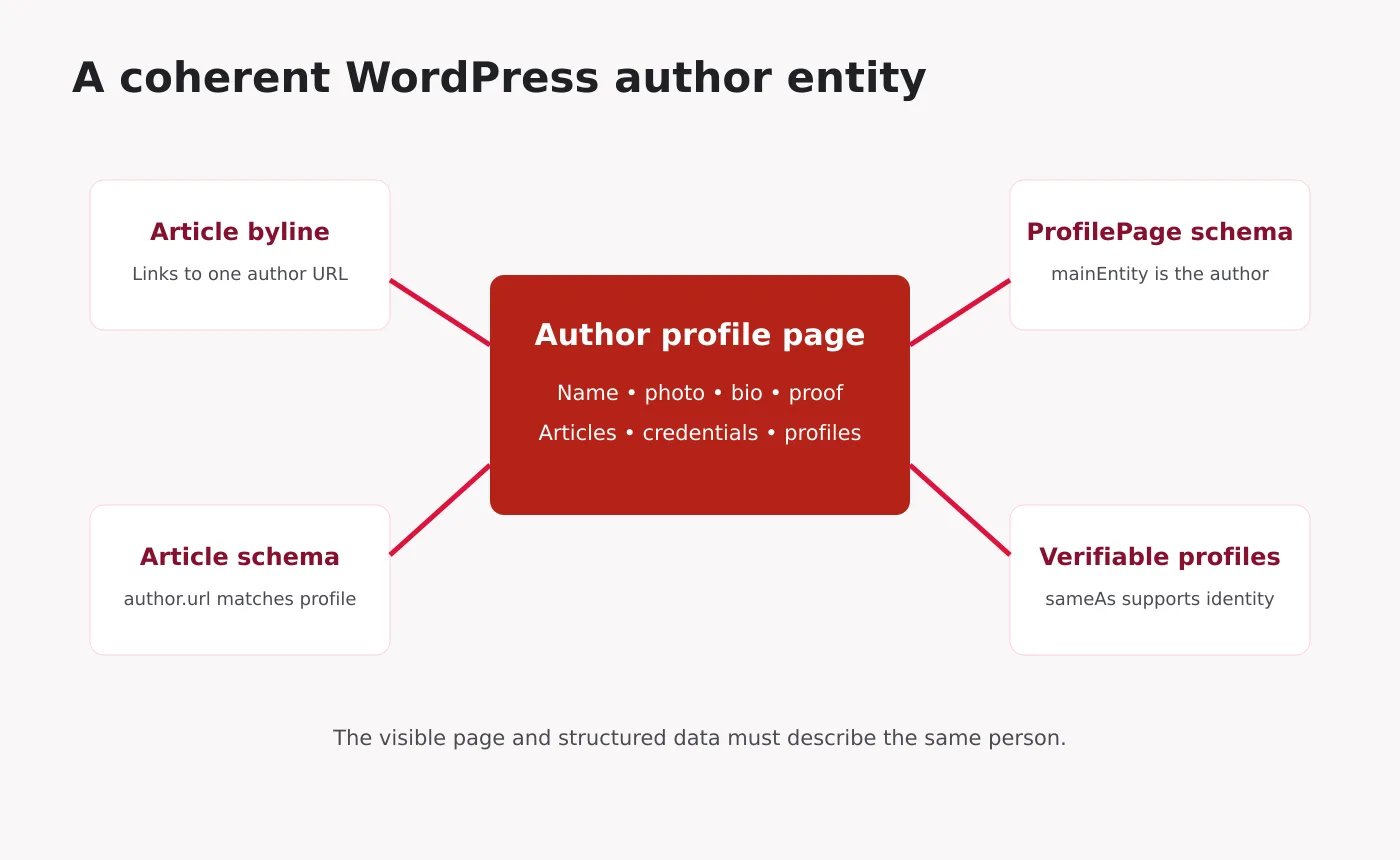
A clean entity graph normally follows this pattern:
- The article’s visible byline names the author.
- The byline links to the canonical author profile.
- Article schema uses the same name and author URL.
- The profile page uses ProfilePage with that Person as mainEntity.
- The Person uses a stable @id and links only to genuine sameAs profiles.
- The publisher Organization remains separate from the Person.
This separation matters on a personal brand site. A person can be the founder of an organization, but the Person and Organization should not be collapsed into one entity with conflicting names and properties.
How Rank Math and WordPress fit together
Rank Math can generate Article, Person and Organization information from WordPress settings and post authors. Before adding custom schema:
- check the site’s Knowledge Graph type and name;
- review the WordPress user’s display name, description and profile URL;
- inspect the schema already output on an article;
- inspect the author or About page markup;
- choose one plugin or theme component as the source of truth.
Duplicate schema is not always invalid, but conflicting schema creates ambiguity. One coherent graph is better than several plugins repeating slightly different versions of the author.
Author archive indexation decisions
Keep the archive indexed when
- the author is real and active;
- the page has a substantial unique bio and proof;
- it provides a useful list of work;
- it has a self-referencing canonical;
- internal links make it discoverable.
Noindex or redirect when
- the archive is an empty default template;
- the same person already has a stronger canonical profile page;
- the account is administrative and not a public author;
- the page duplicates another archive without adding value.
Do not noindex every author page by habit. Decide whether the page serves a reader and supports the publication’s authorship model.
E-E-A-T proof without theatre
E-E-A-T is a useful quality framework, but adding the acronym to a page does not create expertise. Proof should be specific and proportionate to the topic.
|
Claim |
Better proof |
|---|---|
|
“SEO expert” |
Years of focused work, named areas, case methodology and published analysis |
|
“Award-winning” |
Award name, awarding body, year and verification link |
|
“Certified” |
Credential name, issuer, date and current status |
|
“Trusted by clients” |
Permissioned testimonials or case studies with context |
|
“Featured speaker” |
Event page, session title, date and media from the event |
Your About Me page can carry the deeper proof, while the post bio gives readers a concise summary and link.
- List every WordPress user who owns published posts.
- Confirm that each display name is a real public identity.
- Choose the canonical profile URL for each author.
- Improve the visible bio, image, expertise and proof.
- Link every article byline to that URL.
- Check Article schema for correct author type, name and URL.
- Add or validate ProfilePage markup on the profile.
- Remove conflicting Person or Organization data.
- Decide which archives should be indexed, noindexed or redirected.
- Test with the Rich Results Test and URL Inspection.
Common mistakes
- Using “Admin” as the public author.
- Showing one name in the byline and another in schema.
- Linking the author to a thin archive with no bio.
- Using an Organization author for personal opinion pieces without reason.
- Adding fake sameAs links to unrelated profile pages.
- Listing credentials that are not visible or verifiable.
- Creating several near-duplicate author and About URLs.
- Assuming ProfilePage schema guarantees a ranking or rich result.
Frequently asked questions
Google does not promise a ranking boost for adding a bio. A useful bio improves transparency and helps connect content to a credible creator. Thin or fabricated bios do not solve weak content.
It can, but it does not have to. A strong About Me page can serve as the unique author URL when it focuses on that person and links to their work. Redirect or noindex a duplicate thin archive if it has no independent value.
Is ProfilePage schema a rich result?
Google documents ProfilePage markup for eligible profile experiences, but valid markup does not guarantee a special display. Its broader value is a clearer machine-readable description that matches the visible page.
An AI tool should not replace the accountable human or organization responsible for publication. If disclosure is useful, explain how automation assisted and who reviewed the work.
Final takeaway
WordPress author SEO works when authorship is real, visible and consistent. Build one authoritative profile URL for each contributor, support claims with verifiable proof, link bylines to that page and align Article and ProfilePage schema with what readers can see. Treat schema as a description of credibility, not a substitute for it.