AI and Performance Management: What Managers Can Automate—and What Must Stay Human

Use AI to Prepare for the Conversation—Not Replace It
You’re staring at a blank performance review.
Your notes are scattered across emails, meeting agendas, and a document you haven’t opened since March. The deadline is tomorrow. And you still need to find the right words to summarize and document a year of coaching conversations and performance discussions.
So, you open your favorite AI tool.
A few prompts later, you have three polished paragraphs filled with phrases like “strategic ownership,” “proactive communication,” and “opportunities for continued growth.”
It sounds professional.
But is it accurate? Is it specific? Does it reflect what you personally observed? Will the employee understand what they need to continue or change?
And does it sound like something you would ever say to an actual human being?
AI can make performance management more thoughtful and efficient. It can also help managers avoid the most important parts of their job: exercising judgment, having an honest conversation, and building a relationship in which people can grow.
The difference comes down to what you ask AI to do—and what you continue to own yourself.
Note: This is part of our series on human-centered performance managment, which begins here.
AI and Performance Management: A Quick Answer
Managers can use AI to organize examples, improve the clarity of their feedback, prepare thoughtful questions, and summarize agreed-upon next steps.
Managers should never delegate performance ratings, judgments about attitude or potential, consequential employment decisions, confidential employee information, or the performance conversation itself to AI.
A useful rule is:
Use AI to prepare, clarify, and follow through. Don’t ask it to observe, judge, or relate for you.
AI can support the work surrounding a performance conversation. It cannot take responsibility for the leadership at the center of it.
Four Helpful Ways to Use AI in Performance Management
Used thoughtfully, AI can save time and help you prepare for a more useful human conversation.
1. Organize Examples You Have Already Documented
AI can help you sort observations into themes, identify patterns, or arrange examples chronologically.
For example, you might ask an approved AI tool to organize de-identified notes into categories such as:
- Accomplishments
- Customer impact
- Collaboration
- Missed commitments
- Skills demonstrated
- Development opportunities
- Agreed-upon next steps
The critical distinction is that AI is organizing evidence you already have. It isn’t creating the evidence or deciding what the evidence means.
Before entering any information, follow your organization’s AI and data-privacy policies. Don’t paste employee names, medical information, accommodation requests, salary details, complaints, investigation materials, or other confidential information into an unapproved tool.
When possible, remove identifying details and include only the minimum information necessary.
A useful prompt might be:
“Organize these de-identified project examples chronologically. Separate specific, observable behaviors from interpretations or assumptions. Do not add information.”
Then review every line yourself.
AI can organize your notes. It cannot verify that your notes are complete, fair, or accurate.
2. Find Vague, Confusing, or Overly Softened Feedback
This is one of AI’s most useful roles.
You can ask AI to identify vague phrases such as:
- Be more strategic
- Improve your executive presence
- Show more initiative
- Have a better attitude
- Communicate more effectively
- Demonstrate greater ownership
Those phrases might point toward a legitimate concern, but they don’t tell an employee what you observed or what habits they need to adopt to be more successful.
Try a prompt like this:
“Identify vague labels, generalizations, or conclusions in this draft. Highlight where I need a specific observable behavior, an example, an impact, or a clear expectation. Don’t invent the examples for me.”
You can also ask AI to identify language that sounds accusatory, patronizing, or so carefully softened that the real message has disappeared.
If you only ask AI to “make this sound nicer,” it might bury your feedback under several layers of diaper genie feedback.
Your goal isn’t to make important feedback pleasant. Your goal is to make it clear, respectful, and useful.
3. Prepare Better Questions and Pressure-Test Your Assumptions
AI can help you enter a conversation with curiosity instead of a predetermined conclusion.
For example:
“Based on this de-identified situation, suggest five open-ended questions that would help me understand the employee’s perspective. Avoid questions that assume motive, blame, or intent.”
You can also ask AI to separate what you observed from what you’ve concluded:
“Identify any places where I may be assuming attitude, motivation, personality, or intent. Separate observable facts from my interpretations.”
You might discover that:
- “Doesn’t care about the team” is an interpretation.
- “Didn’t respond to three requests for project updates” is an observable behavior.
- “Isn’t leadership material” is a conclusion.
- “Interrupted colleagues six times during the project review” is an observable behavior.
That distinction matters.
You can talk with an employee about behavior and impact. You can’t see their motivation or know their intent without a conversation.
AI can help you prepare thoughtful questions. But once you’re in the conversation, you need to listen to the answers.
4. Summarize Agreed-Upon Next Steps
After a real conversation, an approved AI tool can help you turn your notes into a concise recap.
You might ask it to organize:
- The expectation discussed
- The employee’s perspective
- The agreed-upon action
- The support you will provide
- How success will be measured
- The follow-up date
Verify every detail before sharing the summary.
AI should never turn a tentative idea into a firm commitment or attribute words to an employee that they didn’t say.
A helpful recap begins:
“Here’s what I heard us agree to today. Please let me know if I missed or misunderstood anything.”
That keeps the process human and gives the employee an opportunity to confirm the shared understanding.
Four Things Managers Should Never Delegate to AI
Some performance management responsibilities belong with the manager—even when AI could technically assist with them.
1. Don’t Delegate Performance Ratings or Consequential Decisions
A performance rating can affect compensation, promotion, development opportunities, job security, and an employee’s reputation.
That judgment requires evidence, context, organizational standards, calibration, and human accountability.
Don’t upload a collection of notes and ask:
“What rating should I give this employee?”
AI doesn’t know whether your evidence is representative. It can’t tell whether you documented one employee more carefully than another. It doesn’t understand all the unwritten barriers, opportunities, changing priorities, or systemic issues that affected the work.
The same principle applies to decisions about promotions, performance improvement plans, disciplinary action, or termination.
If your organization uses an approved AI-enabled decision-support system, follow its policies and involve HR. But don’t confuse a system-generated recommendation with an objective answer.
Existing employment laws still apply when organizations use AI in employment decisions. The U.S. Department of Labor cautions that AI can produce discriminatory outcomes, and the Department of Labor emphasizes transparency, worker rights, human oversight, and protection of confidential information.
The manager and organization still own the decision.
2. Don’t Ask AI to Infer Attitude, Motivation, Potential, or the Cause of Poor Performance
AI can’t determine whether someone is disengaged, ambitious, resistant to change, executive-ready, or committed to the organization.
It can generate an interpretation based on the information you provide. That interpretation may reinforce your assumptions instead of challenging them.
Be cautious with requests such as:
- “Does this employee have a bad attitude?”
- “Is she leadership material?”
- “Does he seem committed?”
- “Who on my team has the most potential?”
- “Why is this person underperforming?”
A performance dip could involve unclear expectations, a skill gap, low confidence, competing priorities, inadequate resources, a broken process, burnout, lack of commitment, or a poor role fit.
You discover what’s happening through observation, conversation, and appropriate partnership with HR—not through an AI-generated diagnosis.
AI should never be used to infer an employee’s mental health, medical condition, disability, personality, or other sensitive personal information.
3. Don’t Put Confidential Employee Information Into Unapproved Tools
Don’t paste private employee information into an AI platform simply because doing so is faster.
Use only tools your organization has approved for that purpose. Understand what information may be entered, how it is retained, who can access it, and whether the system uses inputs to improve its models.
When you’re unsure, stop and ask HR, IT, legal counsel, or your data-security team.
Protecting employee information is part of protecting trust.
4. Don’t Delegate the Conversation
AI can help you prepare talking points. It shouldn’t deliver your feedback.
Don’t send an AI-generated message to avoid a conversation that deserves your attention. Don’t hide behind a chatbot, an automated review, or a polished paragraph filled with corporate language.
Your employee needs to hear your observations, ask questions, share context, and understand what happens next.
They also need to see how you respond when they disagree, become emotional, or share information you didn’t know.
That exchange is where leadership happens.
How to Spot AI-Generated “Diaper Genie” Feedback
We call vague, overly softened performance feedback “Diaper Genie feedback.” The manager wraps the real message in so many layers of pleasant language that the employee can no longer tell what’s inside.
AI can produce Diaper Genie feedback with remarkable efficiency.
Consider this:
“Jordan consistently contributes valuable perspectives and demonstrates a strong commitment to team success. Continued focus on proactive communication and strategic ownership will help elevate Jordan’s impact and effectiveness.”
It sounds positive and polished.
It also tells Jordan almost nothing.
What does “proactive communication” mean? What did Jordan do or fail to do? Does Jordan understand the impact? What should change? And what does it mean to “elevate effectiveness”?
A clearer version might be:
“During the last three project reviews, you identified significant implementation risks but didn’t share them until the final week. That gave the operations team very little time to adjust and contributed to two missed deadlines. I’d like to understand what made it difficult to raise those concerns earlier. Going forward, the expectation is that you surface a significant project risk within one business day of identifying it.”
Then have the conversation:
“What’s happening from your perspective?”
“What would help you raise these concerns sooner?”
“What specific action can you commit to for the next project?”
“When should we check in on progress?”
That feedback is more direct and more human. It gives Jordan something specific to understand, discuss, and change.
AI and Performance Management: Five Questions to Ask Before Using AI-Assisted Feedback
Before you use AI-assisted language in a performance conversation or appraisal, check five things.
1. Is it accurate?
Can you personally verify every example, date, claim, and conclusion?
If AI added something that “sounds about right,” remove it.
2. Is it evidence-based?
Does the feedback describe observable behavior and impact—or rely on labels such as “difficult,” “uncommitted,” or “not strategic”?
Replace labels with what you actually saw or heard.
3. Is important context missing?
Did priorities change? Were resources available? Did the employee have the information, support, and authority needed to succeed?
Context doesn’t eliminate accountability. It helps you apply it fairly.
4. Have I checked for bias?
Would you describe the behavior the same way if another employee had done it? Are you rewarding visibility more than contribution? Are you confusing a communication-style difference with a performance problem?
AI can help surface these questions. It can’t guarantee that your conclusions are unbiased.
5. Does it sound human?
Would you say these words out loud? Does the feedback sound like you? Does it make the expectation clear and leave room for the employee’s perspective?
If it sounds as though it came from a policy manual written by a committee of robots, keep working.
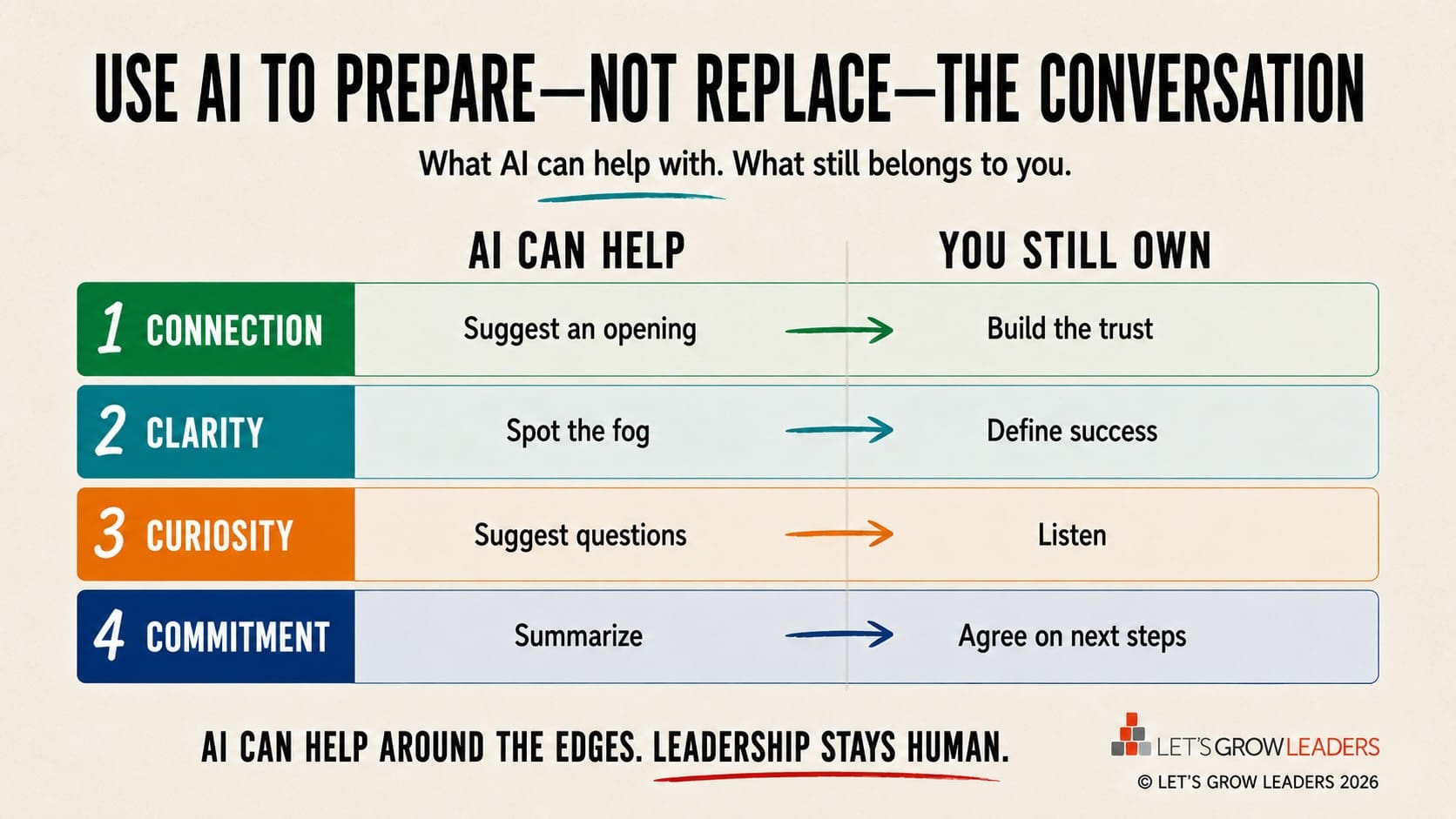
Use the Four Dimensions of the Performance Loop to Keep It Human
AI can help around the edges. The four dimensions remind you what still belongs to you.
Connection
AI can suggest an opening. You build the trust that makes it believable.
Clarity
AI can spot vague language and missing examples. You decide what success looks like.
Curiosity
AI can suggest thoughtful questions. You ask them—and listen closely to the answers.
Commitment
AI can summarize next steps. You and your employee agree on what happens next.
Give Managers Clear Guardrails
Managers shouldn’t have to invent their own rules for using AI in performance management.
HR, IT, legal, and senior leaders should clarify:
- Which AI tools are approved
- What employee information may be entered
- Which uses are permitted or prohibited
- How AI-assisted content must be reviewed
- Who owns final decisions
- How employees can correct inaccurate information
- When managers must involve HR
A policy that says “use AI responsibly” isn’t enough. Give managers realistic scenarios and opportunities to practice using AI as a preparation partner without surrendering their judgment.
AI Can Save Time. It Can’t Do the Work of Leadership.
Used well, AI can help you organize information, prepare better questions, improve clarity, and follow through more consistently.
Those are meaningful benefits.
But AI cannot care about your employee’s success. It cannot notice the hesitation before they answer. It cannot repair trust, recognize courage, or respond thoughtfully to new information.
That work still belongs to you.
Use AI to prepare for the conversation.
Then close the tool, talk with your employee, stay curious, and lead.
See Also:
How to Collaborate With AI Without Losing Your Voice
Performance Management Mistakes With HR
Are you looking to build a culture of human-centered accountability, where leaders at every level have the confidence and skills to set clear expectations and coach employees to high performance? We can help. Contact us to learn more about our custom performance management for human-centered leaders programs, or learn more about our open-enrolment performance management accelerator here.

The post AI and Performance Management: What Managers Can Automate—and What Must Stay Human appeared first on Let's Grow Leaders.