India’s TDS system doesn’t work on a single return form. It assigns a
separate quarterly form to every category of payment and payee. Salary
TDS
goes into Form
24Q. Non-salary payments to residents go into Form
26Q, whereas the same payments, when made to a non-resident
Indian, an OCI cardholder, or a foreign company, get reported through
Form 27Q.
If you’re part of an HR, finance, or payroll team, this form becomes
relevant whenever your organization:
-
Remits interest on NRO accounts
-
Pays royalty or technical service fees to a foreign
entity -
Settles property sale proceeds with an NRI seller
-
Distributes dividends to non-resident shareholders
All of these attract TDS under Section
195 of the Income Tax Act, 1961, and the deductor (that’s you,
not the NRI) must report them every quarter through Form 27Q.
One thing to note: Under the new Income Tax Act,
2025, Form 27Q has been renumbered as Form 144, effective 1
April 2026. The filing process and obligations stay the same.
This guide covers everything you need to know about Form 27Q,
including its meaning, applicability, TDS rates, due dates, how to file
it on TRACES,
penalties for non-compliance, and related forms such as 15CA and
15CB.
Managing TDS on NRI payments across quarters? Keka’s
payroll platform handles TDS calculations, challan tracking, and
quarterly return filing, so your finance team isn’t chasing deadlines
manually.
What is Form 27Q in TDS?
Form 27Q is a quarterly TDS return that records the details of tax
deducted at source on non-salary payments made to non-resident Indians,
OCI cardholders, and foreign companies. The deductor (the person or
entity making the payment) files it every quarter with the Income Tax
Department.
In practice, this form captures how much you paid a non-resident,
what kind of income it qualifies as (interest, royalty, capital gains,
technical service fees, dividends), how much TDS you withheld, and
through which challan you
deposited it with the government. Every transaction gets its own row,
linked to the relevant TDS section and the challan used to deposit the
tax.
Who Must File Form 27Q
Any person, whether resident or non-resident, who deducts TDS under
Chapter XVII-B of the Income Tax Act on payments to a non-resident
(other than salary) must file Form 27Q. This covers individuals, HUFs,
firms, LLPs, companies, trusts, and government bodies.
Both government and non-government deductors have the same core
obligations:
-
TAN is mandatory: You need a Tax Deduction and
Collection Account Number under Section 203A before you can deduct or
deposit TDS. -
Deposit via Challan 281: All TDS deducted must
go to the government through Challan ITNS 281, by the 7th of the month
following deduction. For March, the deadline is 30 April. -
Quarterly filing: Both government and
non-government deductors file Form 27Q on the same quarterly schedule
(July 31, October 31, January 31, and May 31).
Form 27Q
vs Form 26Q vs Form 24Q: What’s the Difference?
All three are quarterly TDS returns uploaded to the same portal. The
difference comes down to who you’re paying and what you’re paying them
for. Getting the wrong form is a common mistake, and it creates
mismatches on TRACES that take time to fix.
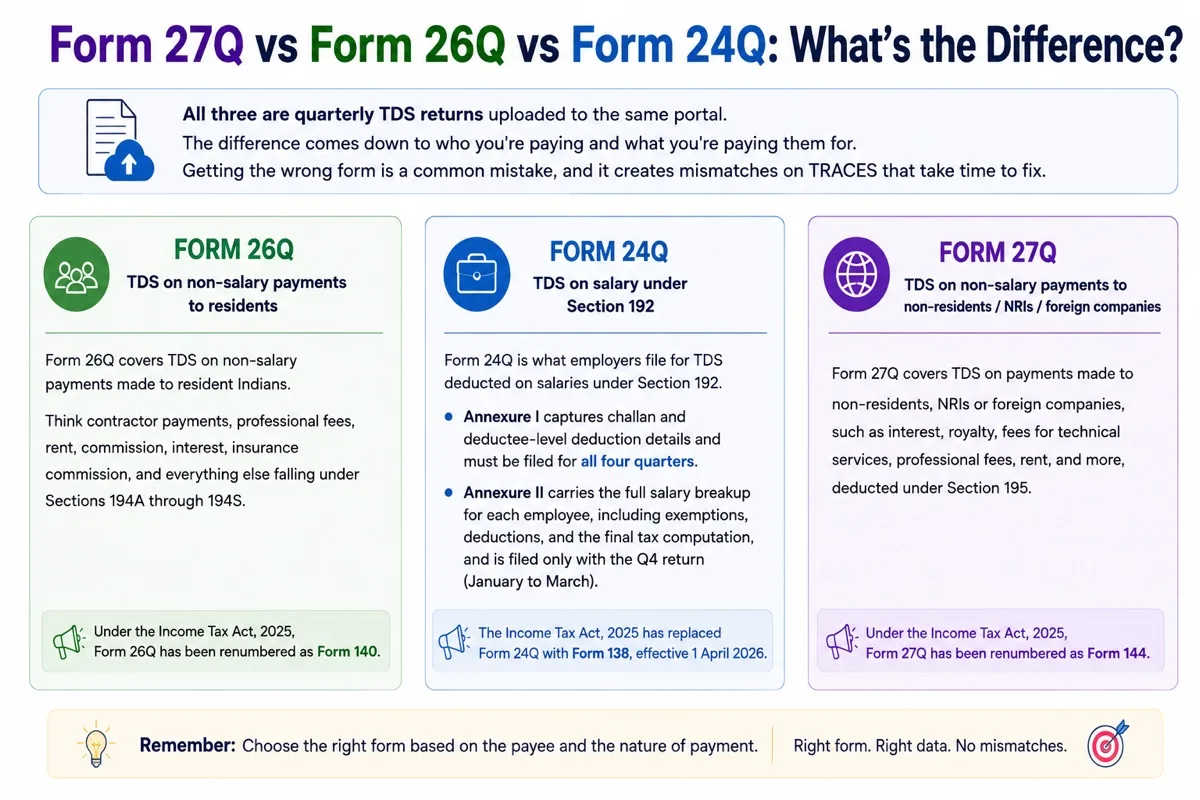
A comparison of Forms 24Q, 26Q, and 27Q, showing which TDS return
applies based on the type of payment and recipient
Form 26Q: TDS
on non-salary payments to residents
Form
26Q covers TDS on non-salary payments made to resident Indians.
Think contractor payments, professional fees, rent, commission,
interest, insurance commission, and everything else falling under
Sections 194A through 194S. If the payee is a resident, the payment is
non-salary, and TDS has been deducted, it goes into Form 26Q.
Under the Income Tax Act, 2025, Form 26Q has been renumbered as Form
140.
Form 24Q: TDS on
salary under Section 192
Form
24Q is what employers file for TDS deducted on salaries under
Section 192. It has two annexures.
-
Annexure I captures challan and deductee-level
deduction details and must be filed for all four quarters. -
Annexure II carries the full salary breakup for
each employee, including exemptions, deductions, and the final tax
computation, and is filed only with the Q4 return (January to
March).
The Income Tax Act, 2025 has replaced Form 24Q with Form 138,
effective 1 April 2026.
A quick comparison across the three:
| Feature | Form 24Q | Form 26Q | Form 27Q |
|---|---|---|---|
| Payment type | Salary | Non-salary payments | Non-salary payments |
| Payee | Resident employees | Residents | Non-residents / NRIs / foreign companies |
| Governing section | Section 192 | Sections 194A-194S | Section 195 |
| Annexures | Annexure I (all quarters) + Annexure II (Q4 only) | Challan + deductee annexure | Challan + deductee annexure |
| New number under ITA 2025 | Form 138 | Form 140 | Form 144 |
| DTAA relevant | No | No | Yes |
| TDS certificate | Form 16 |
Form 16A |
Form 16A |
| Filing frequency | Quarterly | Quarterly | Quarterly |
What Payments Are
Covered Under Form 27Q?
Form 27Q covers all non-salary payments made to non-residents that
attract TDS in India. In practice, most deductors run into four main
categories:
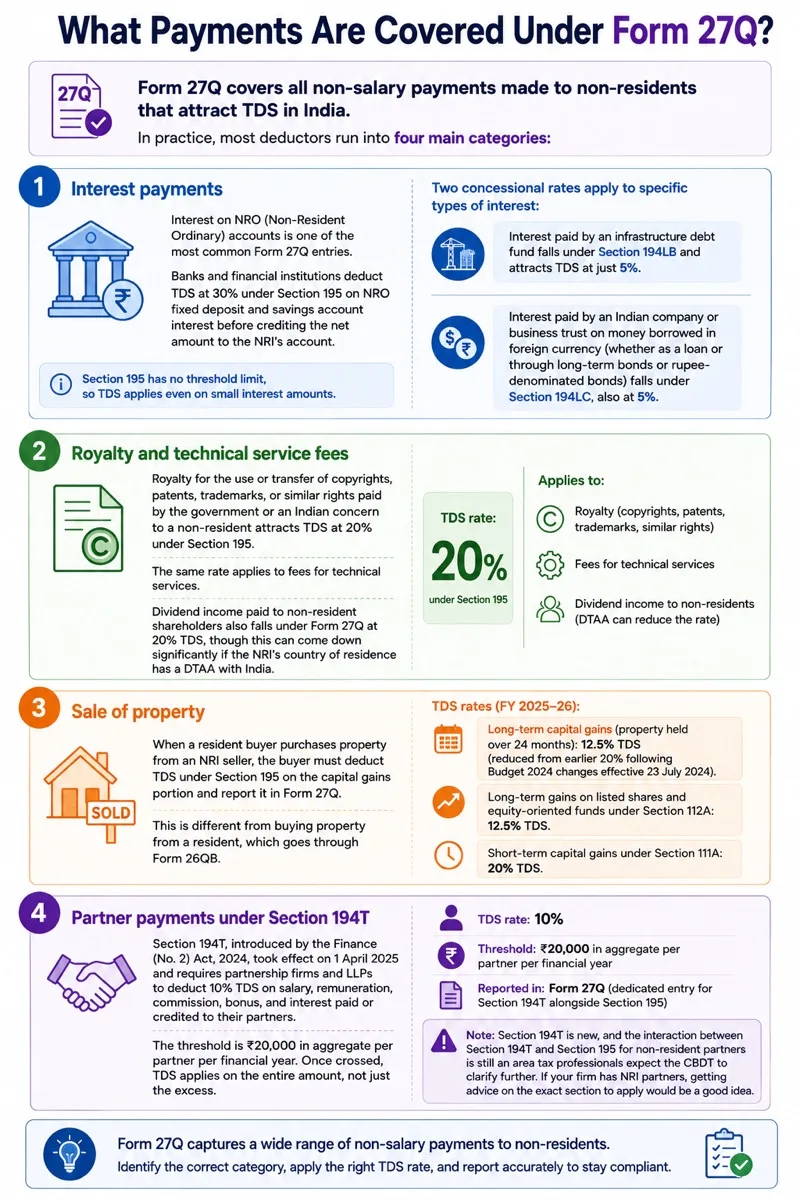
Four main Form 27Q payment categories: interest, royalty and
technical service fees, property sales, and partner payments under
Section 194T
1. Interest payments
Interest on NRO accounts is one of the most common Form 27Q entries.
Banks deduct TDS at 30% under Section 195 on NRO fixed deposit and
savings account interest, with no threshold limit. Two concessional
rates exist: interest from infrastructure debt funds (Section
194LB) at 5%, and interest on foreign-currency borrowings or
long-term bonds by Indian companies (Section
194LC) at 5%.
2. Royalty and technical
service fees
Royalty for the use or transfer of copyrights, patents, or trademarks
paid to a non-resident attracts 20% TDS under Section 195. The same rate
applies to fees for technical services and dividends paid to
non-resident shareholders, though dividend TDS can come down
significantly under a DTAA.
3. Sale of property
When a resident buyer purchases property from an NRI seller, the
buyer deducts TDS under Section 195 and reports it in Form 27Q (not Form
26QB, which covers resident sellers). Long-term capital gains attract
12.5% TDS for FY 2025-26, reduced from 20% after the Budget 2024
changes. Short-term capital gains under Section
111A are taxed at 20%.
4. Partner payments under
Section 194T
The newest addition. Section
194T, effective 1 April 2025, requires firms and LLPs to deduct
10% TDS on salary, remuneration, commission, bonus, and interest paid to
partners once the aggregate crosses ₹20,000 per financial year. The CBDT
has amended Form 27Q to include Section 194T entries, so non-resident
partners receiving remuneration or interest on capital get reported
here.
One caveat: the interaction between Section 194T and
Section 195 for NRI partners is still awaiting CBDT clarification, so
firms with non-resident partners should take specific advice.
TDS Rates
for NRI Payments Under Form 27Q (FY 2025-26)
These are the base rates under the Finance Act. Surcharge and 4%
health and education cess apply on top of these. If a DTAA (The Double
Taxation Avoidance Agreement (DTAA)) rate is available and more
favorable, the NRI can opt for that instead (DTAA rates are applied
without surcharge and cess).
| Section | Nature of Payment | TDS Rate |
|---|---|---|
| 194E | Payments to non-resident sportsman/entertainer or sports association |
20% |
| 194LB | Interest from infrastructure debt fund | 5% |
| 194LC | Interest on foreign-currency borrowings/long-term bonds by Indian company |
5% |
| 195 | Investment income of NRI (interest/dividend) | 20% |
| 195 | Long-term capital gains on listed shares (Section 112A) | 12.5% |
| 195 | Royalty and fees for technical services | 20% |
| 195 | Short-term capital gains under Section 111A | 20% |
| 195 | Any other income (NRO interest, rent, etc.) | 30% |
How to Fill Form 27Q Online?
You cannot type Form 27Q directly into a web form. The process runs
through a downloadable, Java-based utility, validated by a second
utility, and then uploaded to the portal. Here is the workflow:
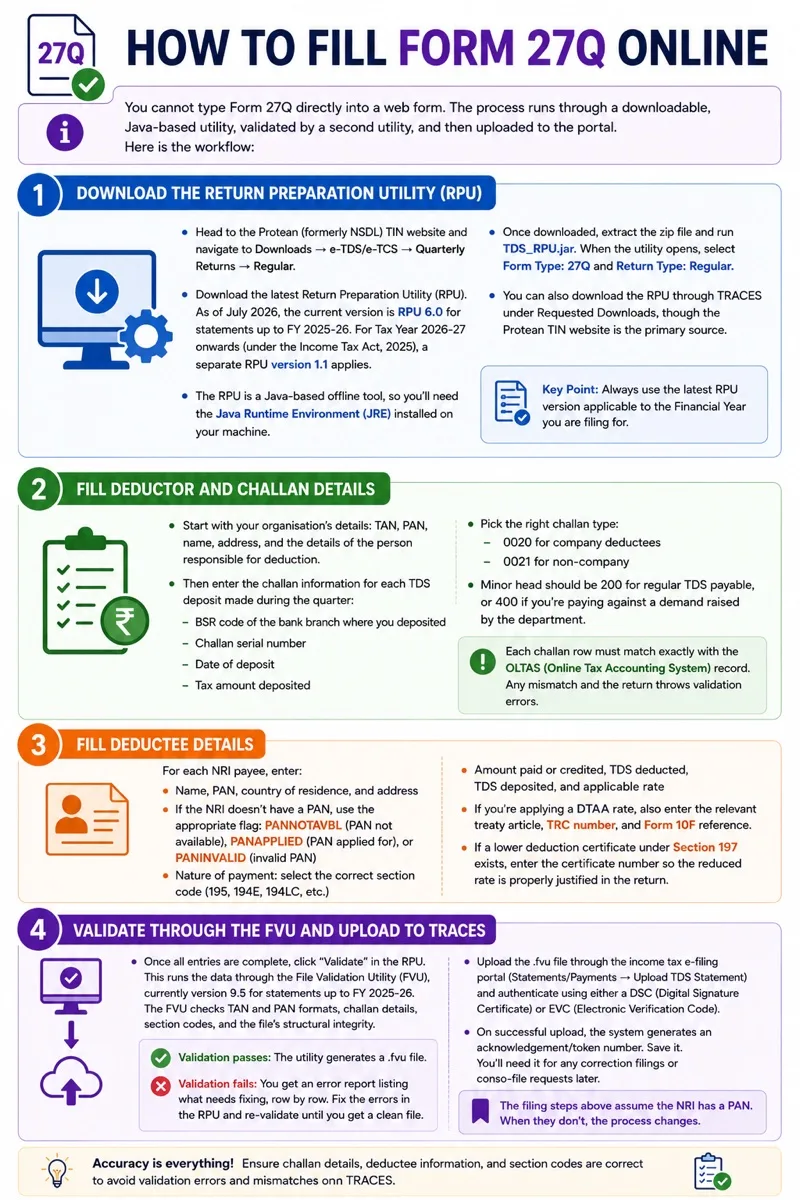
Form 27Q filing process covering RPU download, challan and
deductee details, FVU validation, and TRACES upload
Step 1:
Download the Return Preparation Utility (RPU)
Head to the Protean (formerly NSDL) TIN website and navigate to
Downloads → e-TDS/e-TCS → Quarterly Returns →
Regular.
Download the latest Return Preparation Utility (RPU). As of July
2026, the current version is RPU 6.0 for statements up
to FY 2025-26. For Tax Year 2026-27 onwards (under the Income Tax Act,
2025), a separate RPU version 1.1 applies.
The RPU is a Java-based offline tool, so you’ll need the Java Runtime
Environment (JRE) installed on your machine.
Once downloaded, extract the zip file and run TDS_RPU.jar. When the
utility opens, select Form Type: 27Q and Return
Type: Regular.
You can also download the RPU through TRACES under Requested
Downloads, though the Protean TIN website is the primary source.
Step 2: Fill in
deductor and challan details
Start with your organization’s details: TAN, PAN, name, address, and
the details of the person responsible for deduction.
Then enter the challan information for each TDS deposit made during
the quarter:
Pick the right challan type: 0020 for company
deductees, 0021 for non-company. Minor head should be
200 for regular TDS payable, or 400 if
you’re paying against a demand raised by the department.
Each challan row must match exactly with the OLTAS (Online Tax
Accounting System) record. Any mismatch and the return throws validation
errors.
Step 3: Fill deductee details
For each NRI payee, enter:
-
Name, PAN, country of residence, and address
-
If the NRI doesn’t have a PAN, use the appropriate flag:
PANNOTAVBL (PAN not available),
PANAPPLIED (PAN applied for), or
PANINVALID (invalid PAN) -
Nature of payment: select the correct section code (195, 194E,
194LC, etc.) -
Amount paid or credited, TDS deducted, TDS deposited, and
applicable rate
If you’re applying a DTAA rate, also enter the relevant treaty
article, TRC number, and Form 10F reference. If a lower deduction
certificate under Section 197 exists, enter the certificate number so
the reduced rate is properly justified in the return.
Step 4:
Validate through the FVU and upload to TRACES
Once all entries are complete, click “Validate” in
the RPU. This runs the data through the File Validation Utility (FVU),
currently version 9.5 for statements up to FY 2025-26.
The FVU checks TAN and PAN formats, challan details, section codes, and
the file’s structural integrity.
-
Validation passes: The utility generates a
.fvu file. -
Validation fails: You get an error report
listing what needs fixing, row by row. Fix the errors in the RPU and
re-validate until you get a clean file.
Upload the .fvu file through the income tax e-filing portal
(Statements/Payments → Upload TDS Statement) and
authenticate using either a DSC (Digital Signature
Certificate) or EVC (Electronic Verification Code).
On successful upload, the system generates an
acknowledgement/token number. Save it. You’ll need it
for any correction filings or conso-file requests later.
The filing steps above assume the NRI has a PAN. When they don’t, the
process changes.
How to File Form 27Q Without
PAN?
It’s not uncommon for NRI payees to not have an Indian PAN,
especially foreign companies and non-residents who have limited dealings
in India. Form 27Q can still be filed without one, but the TDS
implications change significantly.
Higher TDS rate under
Section 206AA
Section 206AA kicks in when the payee doesn’t furnish a valid
PAN to the deductor. In that case, TDS must be deducted at the highest
of three rates: the rate specified in the relevant provision of the
Finance Act, the rate in force, or 20%. For most NRI payments under
Section 195, this effectively means 20% or higher.
In the RPU, mark the PAN field as PANNOTAVBL
so the system accepts the return without rejecting it for a missing PAN.
If the NRI has applied for a PAN but hasn’t received it yet, use
PANAPPLIED instead.
Alternative
documentation: Rule 37BC exemption
The higher rate under Section 206AA can be avoided. Rule 37BC
provides a specific exemption for non-residents who furnish the
following documents to the deductor:
-
Name, email address, and contact number
-
Address in their country of residence
-
Tax Identification Number (TIN) issued by their country of
residence -
Tax Residency Certificate (TRC) from the foreign
government
If the TRC doesn’t contain all required details, the NRI must
also submit Form
10F, a self-declaration that fills in the
gaps.
Once all Rule 37BC documents are on file, the deductor can
apply the normal treaty rate under DTAA or the standard Section 195
rate, whichever is more beneficial, instead of the default 20%. This
makes a real difference. An NRI earning interest income could go from
20% TDS (no PAN, no documentation) to as low as 10-15% under a
favourable DTAA, simply by submitting the right paperwork
upfront.
How to Download Form 27Q
from TRACES
You’ll need to download Form 27Q from TRACES for correction filings,
issuing Form 16A, or reconciling TDS credits. Here’s how:
Download the consolidated
file
-
Log in to TRACES at tdscpc.gov.in using your TAN, user ID, and
password -
Navigate to Statements/Payments → Request for Conso
File -
Select the Financial Year, Quarter, and Form Type (27Q)
-
Complete KYC validation by entering the token number from the
originally filed return and the PAN of the responsible person -
Once the status shows “Available” under Requested
Downloads, download the zip file. It contains the .tds file
you’ll import into the RPU for corrections
Form 27Q PDF download and
TXT formats
-
PDF: Password-protected (TAN in uppercase + date
of birth/incorporation in DDMMYYYY format). Used for viewing and
record-keeping. -
TXT: Machine-readable format used for importing
into the RPU for corrections.
Justification report
Before filing any correction, download the Justification Report from
Statements/Payments → Justification Report. It lists
every default the system found in your return: PAN mismatches, short
deduction flags, challan errors. Use it as your correction
checklist.
Form 27Q Correction and
Revision
Filed a Form 27Q with the wrong PAN, a mismatched challan, or a
missing deductee? You don’t need to panic. TRACES allows correction
returns, and you can file them as many times as needed. Each correction
filing replaces the previous version entirely.
Correction types
Every correction falls into a specific category, and you’ll
need to select the right one in the RPU before making
changes:
| Correction type |
What it covers |
|---|---|
| C1 | Deductor details: name, address (not the TAN itself) |
| C2 | Challan details: BSR code, deposit date, amount |
| C3 | Deductee details: name, amount, and other particulars (excluding PAN) |
| C4 | Salary details (relevant only for Form 24Q, Q4) |
| C5 | PAN correction for deductees |
Need to add a completely new challan or deductee row that was
missing from the original return? That’s handled through a C9
correction, which some sources bundle under C5. Always confirm
the exact type your RPU version supports before filing.
Filing a correction
return via TRACES
The process builds on the consolidated file download covered in
the previous section. Import the conso file (.tds) into the RPU, select
“Correction” as the return type, and pick the relevant correction
category. Make your changes in the affected rows, run FVU validation,
fix any errors, and upload the corrected .fvu file to TRACES with DSC or
EVC authentication.
One practical tip: don’t file corrections
based on guesswork. Download the Justification Report
first, identify the exact defaults, and then correct only those rows.
Blanket changes across the return can introduce new errors.
Condonation of delay
If you filed the original return after the due date, the
Section 234E fee (₹200/day) is already locked in and non-negotiable. But
the Section 271H penalty (₹10,000 to ₹1,00,000) can potentially be
avoided.
No penalty under Section 271H is levied if all three conditions
are met: TDS has been deposited with the government, interest and the
Section 234E fee have been paid, and the return was filed within one
year of the due date.
To request condonation, go to Statements/Payments →
Condonation Request on TRACES, select the relevant quarter, and
submit. This doesn’t guarantee a waiver, but if the three conditions
above are satisfied, the penalty is typically not imposed.
Late Filing Penalty for Form
27Q
Three separate penalties can hit you for non-compliance, and they
stack. Understanding which one applies when is important because most
deductors confuse the fee, the penalty, and the interest, and end up
underpaying.
1. Section 234E: Fee for Late
Filing
If you file Form 27Q after the due date, a mandatory fee of ₹200 per
day applies from the due date until the date you actually file. The fee
is capped at the total TDS amount for that quarter, so it can never
exceed what you deducted.
Example: You deducted ₹50,000 in TDS during Q2 but
filed the return 20 days late. The fee works out to 20 × ₹200 = ₹4,000.
Since ₹4,000 is well within the ₹50,000 cap, you pay the full
₹4,000.
This fee is not discretionary. The department doesn’t waive it, and
you must pay it before you can file the belated return.
2. Section
271H: Penalty for Late or Incorrect Filing
Over and above the Section 234E fee, the Assessing Officer can levy a
penalty between ₹10,000 and ₹1,00,000 under Section 271H. This applies
to both late filing and filing with incorrect information (wrong PAN,
wrong section code, mismatched challan details, etc.).
The important carve-out: no penalty under Section
271H is levied if all three conditions are met:
-
TDS has been deposited with the government
-
Interest and the Section 234E late filing fee have already been
paid -
The return is filed before the completion of one year from the
due date
Miss any one of these and the AO has the discretion to impose the
penalty.
3. Section 201(1A):
Interest on Late TDS Deposit
This one is separate from the filing penalties and applies to the
deposit side.
-
Non-deduction: If you failed to deduct TDS when
you should have, interest applies at 1% per month (or part of a month)
from the date the tax was deductible to the date you actually deducted
it. -
Late deposit: If you deducted TDS but didn’t
deposit it on time, interest applies at 1.5% per month (or part of a
month) from the date of deduction to the date of deposit.
Section 201(1A) interest and Section 234E fee are independent of each
other. You can owe both at the same time: the fee for filing the return
late, and the interest for depositing the tax
Getting Form 27Q Right
The compliance chain for Form 27Q is simple to state: deduct TDS
under Section
195 when the payment is made or credited, deposit it by the 7th
of the following month, file the quarterly return by the due date, and
issue Form 16A to the NRI payee within 15 days.
Where teams run into trouble is not the process itself but the
details around it. Applying the wrong rate because the NRI didn’t submit
their TRC on time. Missing a DTAA benefit because nobody collected Form
10F. Letting a quarter slip because only one small payment went to a
non-resident.
Those gaps cost real money: ₹200/day under Section
234E, penalties up to ₹1,00,000 under Section 271H, and Section
201(1A) interest running in parallel.
The fix is building documentation into the payment workflow, not the
filing workflow. Collect the TRC and Form 10F before you release the
payment. Confirm the section code and rate at the time of deduction. And
if you haven’t already, update your internal checklists and software
from Form 27Q to Form 144 for Tax Year 2026-27 onwards, as per the
Income Tax Act, 2025.
If your team is managing multiple NRI deductees across quarters,
Keka’s payroll and
compliance platform can help you automate your TDS compliance
and stay on top of quarterly deadlines.
Frequently Asked Questions
1. What happens if the
NRI payee has no PAN?
Under Section 206AA, TDS must be deducted at the higher of the rate
specified in the Finance Act, the rate in force, or 20%, whichever is
highest. In Form 27Q, mark the PAN field as PANNOTAVBL so the return is
accepted by the system while applying the higher deduction rate.
2.
How can an NRI avoid the higher 20% rate when they don’t have a PAN?
Rule 37BC exempts non-resident payees from the higher Section 206AA
rate if they furnish specific documentation to the deductor: their name,
email, and contact number; their address in the country of residence;
their Tax Identification Number (TIN); and a Tax Residency Certificate
(TRC) from the foreign government. If the TRC doesn’t contain all
required details, the NRI must also submit Form 10F as a supporting
self-declaration. With all Rule 37BC documents in place, TDS is deducted
at the normal treaty rate or Section 195 rate instead of the 20%
default.
Note: Some sources label these categories
differently (for instance, listing C4 and C5 instead of C5 and C9).
Always confirm the exact correction type against your RPU version before
filing.
3.
What are the steps to file a correction return on TRACES?
Start by downloading the consolidated file from TRACES under
Statements/Payments → Request for Conso File, selecting the relevant
Financial Year and Quarter, and completing KYC validation. Once
downloaded, import the file into the RPU and select the appropriate
correction type. Make the required changes in the relevant rows, then
run FVU validation and fix any errors that come up. Once you have a
clean .fvu file, upload it to TRACES and authenticate using DSC or
EVC.
4. Is Form
27Q required when property is sold BY an NRI?
Yes. When a resident buyer purchases property from an NRI seller, the
buyer must deduct TDS on the sale proceeds under Section 195 and report
it in Form 27Q for that quarter. This is different from buying property
from a resident seller, which goes through Form 26QB.
5. Can DTAA rates be
applied in Form 27Q?
Yes. If the NRI provides a valid Tax Residency Certificate (TRC) and
Form 10F, the deductor can apply the applicable DTAA rate and reflect it
in Form 27Q. The DTAA rate is often lower than the standard domestic
rate under Section 195.