

Matelume is a Windows app that turns flat images (scans, catalogue swatches and digital designs) into seamless, true-scale PBR materials: fabric, wall art and marble.
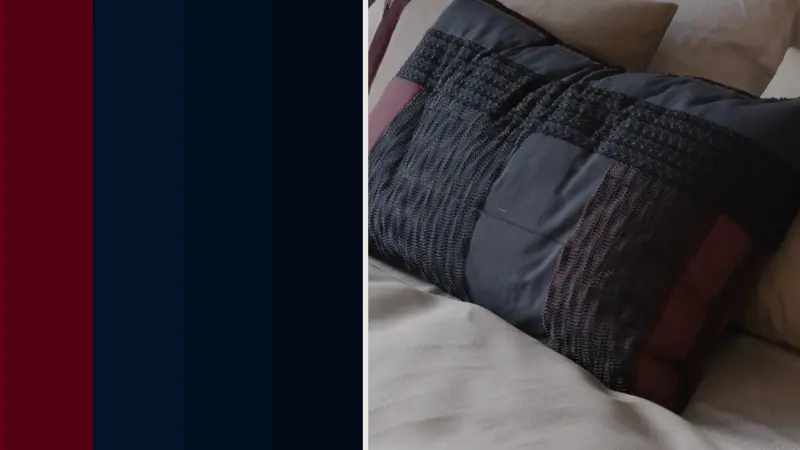
On the left of the picture above is the only image we started from: five plain colours. On the right is a Cycles render of the fabric Matelume made from it, with the weave and stitched bands. It came into Blender in one click, and nobody edited the imported material. Scene and models by iMeshh.
Making it takes a few clicks: pick a flat image, choose Fabric, set its real size, click the parts that stand up, pick a stitch, then Send to Blender. The add-on builds the material for you, so there’s no node editing. On our test laptop, a 4K fabric with a construction and imperfections takes about two minutes on the graphics card.
Matelume exports the standard map set from 2K up to 8K. The Blender add-on needs Blender 4.2 or later, and there’s a 3ds Max plugin for V-Ray and Corona. Windows only; it needs an account and an internet connection.
See matelume.com/download for the current free trial and plans.
Your next interior design companion.
![Matelume: realistic fabric materials from flat images, into Blender in one click [$]](https://fivemor.com/wp-content/uploads/thumbs_dir/1791326661_homepage-ruh77po8oemmlq9c7u9sqdnry7bvzk8y4z7iega530.jpeg)
![Matelume: realistic fabric materials from flat images, into Blender in one click [$]](https://fivemor.com/wp-content/uploads/thumbs_dir/homepod-1200-ruh7ijr9gngmfwipy0vyz582h3x7py9jyly0ka7rcs.jpg)


